
Rebel Inc: Scenario Creator
Ndemic CreationsEntertainment
4.241.00 Reviews
- Version
- 1.3.3
- Installs
- 10.00K
- Age Rating
- Teen
Screenshots
Our Review of Rebel Inc: Scenario Creator
 Analysis by Appyee
My first reaction to Rebel Inc: Scenario Creator was that it asks for a different kind of attention than a typical strategy game. Instead of simply taking on a ready-made challenge, I’m interested in shaping one and seeing how its parts work together. That creative angle is the reason I’d give it a place on my phone, though it also means the appeal depends on whether I enjoy tinkering as much as playing.
The first-week appeal: building, then testing
During the first few sessions, the strongest draw is learning how a custom scenario comes together. You can make choices about the setting and the pressures players face, then try the result rather than treating your design as a static idea. I like that loop: make a change, play through the situation, and notice whether the challenge feels fair or lopsided. The editor is most rewarding when I approach it as a series of small experiments instead of trying to produce a perfect scenario in one sitting.
That makes this a better fit for someone who already enjoys the strategic world of Rebel Inc than for someone looking for a quick, self-contained entertainment app. The creator is built around custom scenarios, so its first-week novelty comes from discovery and experimentation. If you want a straightforward game that supplies a steady sequence of ready-to-play stages, the original game or another conventional strategy title may be a better starting point.
What makes a scenario satisfying
A useful design habit is to begin with one clear challenge and test it before adding more complications. If a scenario feels too easy, it can be tempting to turn up every source of pressure at once; I find it more informative to change one element and replay. That gives me a better sense of what actually affects the experience, and it makes later revisions easier to understand. A scenario should be demanding for a reason, not merely crowded with obstacles.
The same principle helps when I’m designing for another player. I’d rather provide a scenario with a coherent premise and a readable difficulty curve than one that is punishing simply to prove it can be. Thinking about what a newcomer will understand, what a returning player will find interesting, and where a challenge might become frustrating gives the editor a purpose beyond making a complicated map. It also sets a manageable goal for a short session: refine one idea, test it, and leave the larger redesign for later.
Create Your Own World
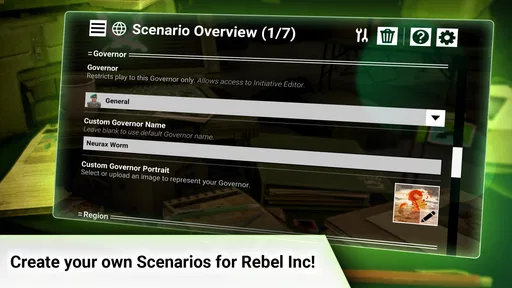
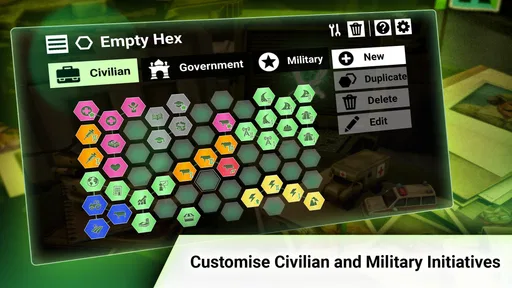
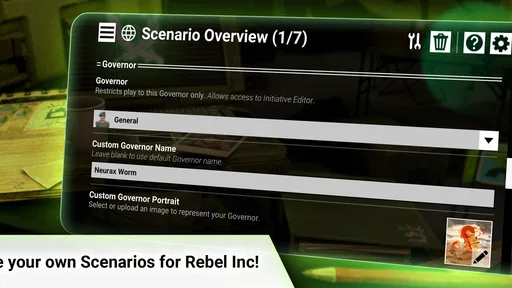
Alright, here's the deal. With Rebel Inc: Scenario Creator, you're not just playing a game; you're creating one. The app gives you all the tools you need to build your own scenarios. Imagine being able to craft a unique geopolitical landscape complete with all the challenges and nuances you can think of. It's like being a game designer without having to know a single line of code.
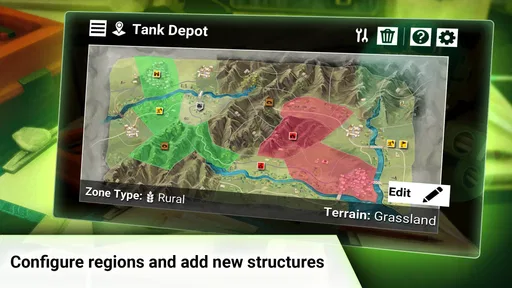
The interface is super intuitive. You start off by choosing the region you want to focus on, and then you dive into the nitty-gritty details. Want to add a river here or a mountain there? Go for it! The possibilities are endless. It's like playing God but, you know, with a lot more responsibility and a lot less smiting.
Gameplay Mechanics
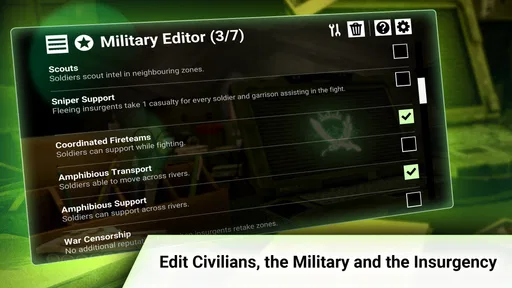
Now, let's talk about how it all works. The mechanics are similar to the original Rebel Inc game, where you have to stabilize a region by winning over the local population and dealing with insurgent threats. But here's the twist—you get to design those threats! You can craft the perfect storm of civil unrest, economic challenges, and political turmoil. It's your sandbox, and you get to decide how challenging or laid-back you want it to be.
And don't worry if you're new to scenario creation. The app comes with a handy tutorial that walks you through the basics. So, whether you're a seasoned strategist or a newbie, you'll find your footing in no time.
Making time for the editor
In an ordinary day, I’d use it in two different ways. On a commute or during a short break, I might open a scenario I’ve already made and test a single adjustment. When I have a quieter evening, I can spend longer shaping a concept and trying to make its difficulty feel intentional. That split matters: the editor can be satisfying in brief visits, but a complex idea is easier to manage when I have time to remember what I changed and why.
For a practical workflow, I’d keep a simple mental note of the scenario’s goal before editing: what should make this run tense, and what should give the player a chance to recover? Then I’d test the design, identify the most obvious source of imbalance, and revise that part first. This is more useful than repeatedly changing several settings and losing track of which decision improved or damaged the result. It also makes the creator feel less like an endless menu and more like a compact design workshop.
Who gets the most from it
I’d recommend it most to people who already enjoy Rebel Inc’s strategic decisions and want to shape the conditions around them. It also suits players who like sharing a challenge and seeing whether another person interprets it differently. The creator can turn a familiar strategy framework into a personal project: a scenario can be adjusted to test one specific idea, then revisited when the original challenge becomes predictable.
It is less suitable if you mainly want a polished sequence of developer-made missions, dislike trial and error, or rarely enjoy replaying a scenario after changing it. Scenario creation asks you to supply some of the motivation yourself. The satisfaction is not only in winning; it’s in deciding what the challenge should be and then judging whether the result is worth playing. If that sounds like work rather than fun, a conventional strategy game will probably serve you better.
How it differs from familiar alternatives
Compared with a standard strategy game, where the designer has already set the map and challenge, this app puts more responsibility in the player’s hands. That freedom is its clearest distinction, but it is also a trade-off: a ready-made campaign can get you into the action faster, while an editor asks you to make choices before the interesting test begins. Compared with a general creative sandbox, the focus here is narrower and tied to Rebel Inc’s strategic setting rather than open-ended world-building.
The sharing option can extend the experience beyond my own designs, but I would treat community scenarios as a source of variety rather than assume every one will match my taste. A good way to use them is to look for a challenge that tests a different approach from the one I usually take, then borrow the design lesson—not necessarily the exact setup—for my next creation. That keeps browsing purposeful instead of turning into an aimless search for something endlessly new.
Sharing without losing the point
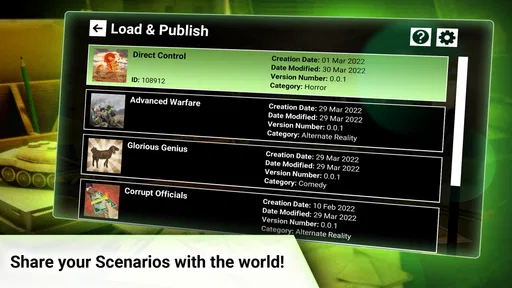
What's a great scenario if you can't share it with the world, right? Rebel Inc: Scenario Creator has a fantastic sharing feature. Once you've created your masterpiece, you can upload it to the community hub where other players can download and play it. It's like having your own little corner of the Rebel Inc universe.
And speaking of community, the app has a vibrant, active user base. You can download scenarios others have created, giving you endless gameplay possibilities. It's like having a never-ending supply of DLCs, all for free!
For me, sharing is most worthwhile when I have tested a scenario enough to explain what it is trying to do. A small, focused design is easier for another player to understand than one that combines every idea I had while exploring the editor. I’d also be prepared for feedback to be mixed: players may approach the same challenge with different habits, and a scenario that feels tense to its creator may feel unfair to someone else. That is not a reason to avoid sharing; it is a reminder that other people’s reactions can reveal blind spots my own playtesting missed.
Month-to-month value, and the effort it asks for
Whether this earns lasting space on my phone depends on how often I want to create or revisit scenarios. Its recurring value comes from designing, testing, adjusting, and exploring other players’ work—not from a daily routine that the app imposes. If I enjoy returning to a half-finished idea, or I like trying community challenges between my own projects, it can remain useful after the first burst of curiosity. If I finish one design and have no interest in another, the novelty may fade quickly.
The maintenance burden is mostly mental. A project can become harder to judge when I change several things at once, and an old scenario may not feel as fresh when I come back to it. I’d keep the scope modest, make deliberate revisions, and treat a successful design as something to revisit only when I have a specific reason. This avoids turning a relaxing hobby into an obligation to keep producing content.
There is also a real distinction between making something for myself and making something for a community. Personal experiments can be uneven and still teach me something; shared scenarios need more attention to clarity and fairness. If I don’t want to spend time testing and refining, I can still enjoy other people’s creations, but I shouldn’t expect the editor itself to provide the same immediate payoff as simply starting a ready-made game.
Where fatigue can set in
The main risk is repetition in the creation process. Once I understand the basic loop, changing details may not feel meaningful unless I have a clear design question to answer. It can also be tiring to keep adjusting difficulty for an imagined audience, especially if I start treating every scenario as something that must be broadly appealing. I’d avoid that trap by making projects for a particular kind of play experience and accepting that not every idea needs to become a polished community release.
There’s a learning curve even with a tutorial, because understanding the controls is not the same as understanding what makes a scenario enjoyable. New creators may need several attempts before their designs feel balanced. That trial and error is part of the appeal for me, but it is a genuine limitation for anyone who wants the app to deliver immediate results with little planning.
Price, access, and practical fit
This is a paid entertainment app, listed at $3.99, so I’d decide based on whether I’m likely to use the editor rather than on the idea of having extra content in theory. Ndemic Creations is the developer, and the app has a 4.2 average from around 240 ratings, with over 10,000 installs. Those figures give a quick sense of its audience, but they matter less to my decision than whether I enjoy making and testing custom strategy challenges.
It is rated Teen, and it was released on May 10, 2022. The current version is 1.3.3, and it requires Android 6.0 or later. Those are useful checks before installing, especially if I’m considering it for a younger player or an older device. I’d also think about how the recipient likes to play: someone who wants to create and iterate is a much better match than someone who only wants a quick distraction.
Final Thoughts
So, is Rebel Inc: Scenario Creator worth your time? Absolutely. If you're a fan of strategy games and love the idea of creating your own worlds, then this app is a no-brainer. It combines creativity with strategic depth in a way that's both engaging and highly replayable.
Plus, the satisfaction of seeing your scenario come to life and challenging others to conquer it is second to none. So go ahead, download the app, and let your imagination run wild. Who knows, you might just create the next big thing in the Rebel Inc community.
My long-term verdict
My recommendation is enthusiastic but specific: I’d choose it for a player who wants to keep experimenting with Rebel Inc’s strategic setup, not for someone who simply wants more conventional missions. The editor can earn a lasting place when I have a reason to return—a design to refine, a community scenario to try, or a particular challenge I want to test. Without that personal interest, it is easy to imagine enjoying the concept more than the ongoing work.
For the right person, though, that work is the point. I’d start with one compact idea, playtest it before sharing, and let the results decide whether it deserves another round. That approach keeps the experience playful and gives the app a fair chance to become more than a first-week curiosity.
Verdict
Strengths of Rebel Inc: Scenario Creator
- User-friendly interface for easy navigation.
- Wide variety of customization options.
- Real-time preview of scenarios.
- Seamless integration with Rebel Inc.
- Regular updates and support.
Limitations of Rebel Inc: Scenario Creator
- Limited free content without purchases.
- Requires internet connection for some features.
- Learning curve for complex scenarios.
- Occasional bugs with scenario saving.
- Mobile performance can vary by device.
Other Releases by Ndemic Creations
View All
Plague Inc.
Simulation4.7

Plague Inc: Scenario Creator
Productivity4.3
Similar Picks in This Category
View All
Google Play Games
Google LLC3.9

Netflix
Netflix, Inc.4.8

YouTube Kids
Google LLC4.2

Disney+
Disney4.4

Prime Video
Amazon Mobile LLC4.7

Steam
Valve Corporation3.2
Frequently Asked Questions
What is Rebel Inc: Scenario Creator?
Rebel Inc: Scenario Creator is an engaging app that allows players to design and share their own scenarios for the popular game Rebel Inc. Users can craft custom maps, set unique conditions, and introduce creative challenges, providing endless replayability and personal expression in gameplay.
How easy is it to use the Scenario Creator?
The Scenario Creator offers a user-friendly interface that caters to both beginners and advanced users. With intuitive drag-and-drop features, detailed guides, and a supportive community, even those new to game design can easily navigate the process of creating detailed and complex scenarios.
Can I share my scenarios with other players?
Yes, one of the standout features of the Scenario Creator is the ability to share your custom scenarios with the Rebel Inc community. You can upload your creations for others to download, ensuring a vibrant exchange of ideas and gameplay experiences among players worldwide.
Is there a cost associated with using the Scenario Creator?
The Scenario Creator is available as a free extension for players who already own Rebel Inc. However, there might be in-app purchases or premium features that enhance the creation experience, providing additional tools or options for a more personalized and advanced scenario design.
What platforms support Rebel Inc: Scenario Creator?
Rebel Inc: Scenario Creator is available for both Android and iOS devices. It requires the base game Rebel Inc to function and is optimized for a seamless experience on smartphones and tablets, making it accessible for a wide range of mobile users.
